Riding
From signing up to rating your driver, booking ahead and hiring a car by the day, in thirteen steps. Press Next to go through it, or Play.
Step 1 of 13
Create your account
Your details, a password and a live photo of your face.
Tap Sign up. Give your first and last name, your email, a password of at least 8 characters (twice), your phone, your country and your address, and choose Rider or Driver as the account type. Give your gender and birth date, and your emergency contacts: a name and an email, with a relation and a phone if you like. Women and members under 18 give two, everyone else one; you can change them later in My profile under Emergency contacts. If a trip of a woman, a rider under 18 or over 70 takes unusually long and no road event was reported on its way, the contacts get an advisory email (you can turn it off in My profile). Your contacts can watch your trips on the map: signed in with the email you gave for them, they open Watch a trip and enter the trip number, or your phone or email. When a trip of a woman or a rider under 18 runs late, the car's and the phone's GPS positions are kept from then on. Under Your photo, tap Open the camera and take a photo of your face with the front camera: it is shown to the driver or rider you are matched with. Then press Create account.
Sign up →Step 2 of 13
Send your ID
A photo of your national ID card or passport, once, before your first ride.
Every member, rider or driver, gives their national ID or passport. Choose the ID type (National ID card or Passport) and type the ID/Passport number. In the box National ID or passport photo, tap Take a photo to open the camera in the page (the back camera on a phone) and press Take the photo, or tap Upload the photo to choose a picture you already have. After a photo is taken the box says Photo captured. Hold the side with your photo and number flat, in good light, with every word readable. The ID is seen only by Taxi saab taxi.
Your ID →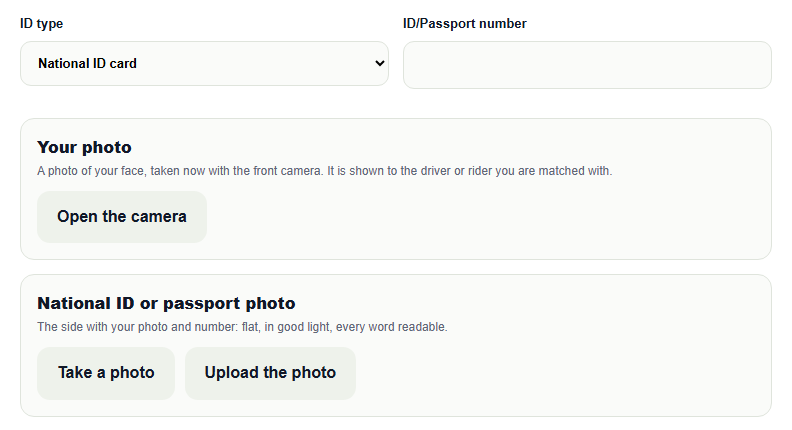
Step 3 of 13
Request a ride
Where to pick you up and where you are going.
Sign in and tap Ride. In From, type the pickup address: your recent places are suggested, or tap Use my current location, or Choose on map. In To, type the destination or choose it on the map. The distance of the trip is shown under the form once both are known.
Request a ride →Step 4 of 13
Passengers, suitcases and vans
Say how many of you there are, and ask for a van if you need one.
Set Passengers and Large suitcases. If you need a van, tick Van needed. Only a vehicle with room for your passengers and suitcases gets your request, and with Van needed only vans get it. Drivers see what you asked for on the request.
Request a ride →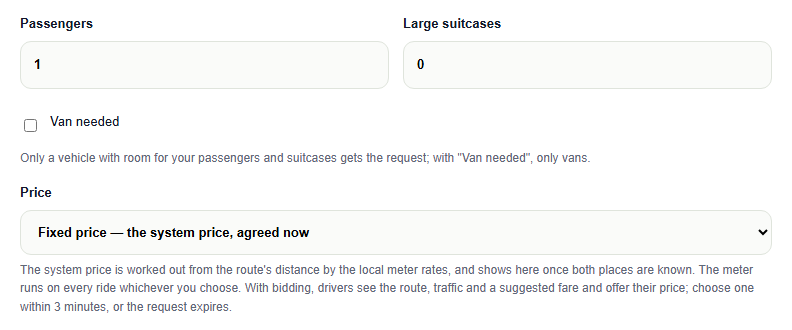
Step 5 of 13
Choose how the price is set
A fixed price now, the meter, or drivers' bids.
Under Price choose one of three. Fixed price: the system price, worked out from the route's distance by the local meter rates, agreed now. By the meter: you pay what the meter shows at the end. Let drivers bid: drivers see the route, the traffic and a suggested fare and offer their price; you choose one bid within the bidding window, and if you choose none in time the request expires and you can request again. Then press Request ride.
Request a ride →Step 6 of 13
Choose how you pay
Cash is always there; your default is used unless you change it.
Under Payment the form shows your default method. Tap Change payment method to use another one for this ride. Cash fares go to the driver in full: Taxi saab taxi takes no commission from member drivers. In some countries there is a small taxi calling fee per ride, shown on the form. During the test, cash is the default for everyone and cards cannot be added yet.
Request a ride →Step 7 of 13
Book a ride ahead
Choose a pickup time from 1 hour to 90 days ahead.
On the Ride form, under When, choose Book ahead and give the Pickup date and time: from 1 hour to 90 days ahead. You can also tap Book a ride appointment on the home page. Drivers can take your booking as soon as you send it; 30 minutes before pickup it becomes an accepted ride, and the rest is like any ride. Your bookings are listed under My bookings ahead in My rides. While no driver has taken it you can tap Send it out now as a regular request. Cancel booking is free until 2 hours before pickup, or at any time while no driver has taken it; later it costs a penalty of $10, and half of it goes to the driver who had taken it. Paid by card, the penalty is charged to your card; otherwise you owe it and cannot request a new ride until it is paid. Paid by card, the fare is charged when a driver takes your booking and Taxi saab taxi holds it: the driver is paid when the ride is completed, and the money comes back to you if the booking is cancelled or nobody takes it. If no driver takes it by 30 minutes after the pickup time, it is closed.
Book a ride ahead →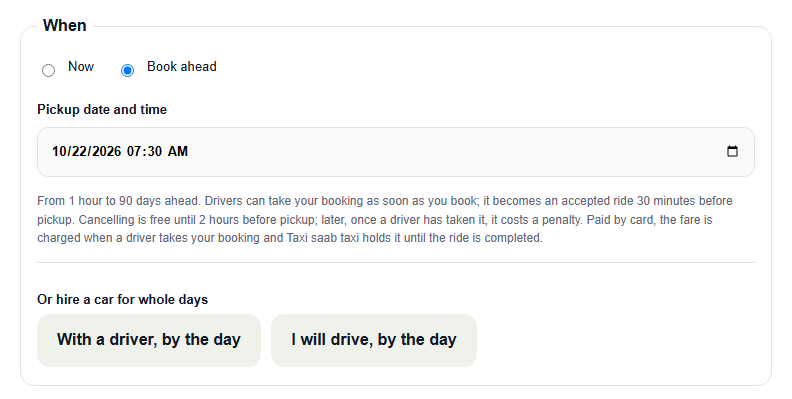
Step 8 of 13
Hire a car by the day
With a driver, or you drive: a pickup place, the days and a price a day.
Tap Rent a car on the home page, or on the Ride form choose With a driver, by the day or I will drive, by the day. With a driver: give the start date and time, the number of days (1 to 30) and the pickup place; there is no destination, the driver takes you where you ask. The price a day is the car's rent, the driver's time and the driver's food. I will drive: give the pickup place and the place to return the car; the price a day is the car's rent. To drive the car yourself, first send a photo of your driving licence (the front, and the back if you like) with its number, expiry date and country under Your driving licence; the car's owner checks it before taking your hire, and it must be valid until the car is due back. Tick that you carry insurance for any damage or loss in the country where you drive, or take the risk: Taxi saab taxi sells no insurance and is not responsible for damage or loss. The prices a day are set for your country and shown before you book, plus a Taxi saab taxi admin fee of $3 once per hire. Cancelling is free until 2 hours before the start; later the $10 penalty applies, as for a booked ride. Paid by card, the total is charged when a driver takes the hire and held until the hire ends; otherwise you pay the driver at pickup.
Hire a car by the day →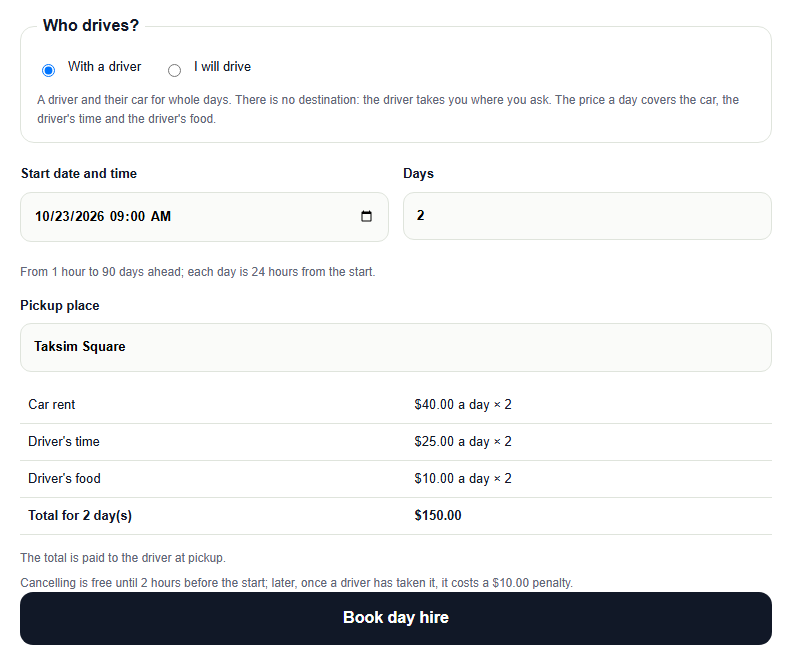
Step 9 of 13
Meet your driver
Check the car and the driver, then tell the app you are in.
When a driver accepts, the ride's page shows the driver's photo, the car and its plate, a live map of the car, and Messages, where you can also Send my location. Before you get in, match the car's make, model and plate and the driver's photo, and ask for the pickup code if the driver uses one. Once you are inside, tap We are in the car: until then the driver cannot start the meter.
Request a ride →Step 10 of 13
Share your trip
Let family or friends watch where your taxi is.
On the ride's page, under Share this trip, type the email your parent or friend signs in to Taxi saab taxi with and tap Share; you can add up to 5 people and remove anyone at any time. Give them the trip number shown on the page. They sign in, tap Watch a trip, and enter the number: they see your name and trip, the driver's first name and photo, the car and its plate, and the car moving on the map while the ride is on. When the trip ends the page says so and the map goes. Drivers can share their trip the same way.
My rides →Step 11 of 13
Dangers on the road and the safe route
Report what you see, and go around danger.
Tap Report a road event to report a traffic accident, a road hazard, bad weather, heavy snow, political turmoil, riots or a road closure, where you are or at a place on the map; tick Danger to life when it is. Riots, turmoil and heavy snow always count as a danger. Others nearby tap Still there or Gone. When a danger to life is reported near your trip, it flashes on your screen. Tap Take the safe route, or choose it once for all trips in your profile under Road safety: the trip then goes around the danger, and the map shows the safe route in green. The safe route can be longer: on a fixed price or a bid, a trip that takes the safe route or ends at a safe place is charged by the meter, the driver's time and the distance driven. If you cannot pay it all, you pay the booked price and owe the rest, to pay within 3 days; until it is paid you cannot request a new ride. During the trip, keep the ride page open: a sample of where the trip goes is kept about once a minute from your phone and the driver's, and if the driver's phone stops sending the car's position, the page tells you and the last known place is recorded. Your driver will not leave you in a danger area: they bring you to a safe place where you can get help and find transport. Bad weather, snow, turmoil or riots near the pickup or the destination can make fares higher, shown before you book.
Road safety →Step 12 of 13
Agree the fare at the end
On a card ride you are asked to agree, within 3 minutes or 30 seconds.
At the destination the driver ends the trip with the meter's fare, which they cannot change, plus any tolls, fees and extras with what they are for. A cash ride is settled with the driver in person. On a card ride your phone asks Do you agree with this fare? Agree, and the total is charged. Disagree, and the total is charged all the same while a dispute case opens: Taxi saab taxi reviews the trip and refunds to your card whatever is not owed. You have 3 minutes to answer, or 30 seconds when the trip ends in a busy commercial or downtown area, in busy hours or in heavy traffic; the page counts it down. No answer in time, and the total, the meter fare and the extras, is charged automatically.
Request a ride →Step 13 of 13
Rate, tip, or report a problem
Stars, a tip, and a way to complain about a ride.
After the ride, open it from My rides. Rate your driver from 1 to 5 stars. On a card ride you can Tip your driver by card, and the page says what share of the tip the driver receives; otherwise give a tip in cash. Under Report a problem with this ride, choose what went wrong (the driver never came, a charge for a trip you did not take, a wrong fare, the driver's behaviour, safety) and describe it: Taxi saab taxi answers on the ride's page. Left something in the car? The same page has Forgot something in the car?
My rides →Taxi saab taxi · the same guide is on the How to page at taxisaabtaxi.com. A saved copy of these slides plays on its own, without the screenshots.